Full Stack. AI. System Design. One Cohort.

Java Spring · DSA · GenAI · Microservices · Security · Docker & Kubernetes · System Design · Web3 & Blockchain — all in one structured 8-month live program. Built for engineers who want to ship real products and land real offers.


View Syllabus

See exactly
how learning
works at SCALive.

This is a real classroom session — from concept to code, review to deployment. No edits. No shortcuts. Just how we teach.
Sr. Trainer · Sharma Computer Academy
Sachin Kapoor
25+ years of experience
WHAT YOU'LL LEARN INSIDE THE COHORT
  • Java SE, OOPs, DSA & Spring Boot ecosystem
  • Full-stack web development with React & Spring
  • Spring Security, JWT, OAuth2 & Microservices
  • Docker, Kubernetes, Spring Cloud & System Design
  • Generative AI, RAG & Spring AI
8
Months
Live
Classes weekly
1 : 1
Mentorship
Join Cohort 12.0 Register Now — Cohort 12.0 — start date to be announced
Your Launchpad

Start strong. Stay consistent. Become career-ready.

You won’t just follow along. You’ll build full systems — the kind you can actually talk about in interviews and ship in production.

Current Batch
Cohort 12.0
Schedule
Mon - Fri
9:00 PM IST
Format
Live + Recorded
Rewatch anytime
Language
Hinglish
Hindi + English
Certificate
Included
On completion
What you actually get
  • 300+ hours of live classes with recordings and clear session notes
  • Structured roadmap across DSA, Full-Stack, AI, DevOps, and System Design
  • Weekly assignments and project sprints with mentor code reviews
  • Doubt solving with the team groups
  • Resume updates, mock interviews, and placement guidance till your first role

We don't just teach.
We build with you.

Cohort 12.0 isn’t something you watch alone. It’s a system — mentors, peers, and real deadlines working together.

T

Team-room culture

Work in small teams, review each other's PRs, and build like a real engineering team — because that’s the job.

M

Mentor reviews

Experienced engineers review your code, challenge your design decisions, and push back on shortcuts.

I

Internship track

Top performers move into paid internships with partner startups. You’re expected to perform, not just participate.

R

Real products

Ship internal tools and public apps used by real people. Your work speaks before you do.

500+ builders, have already made it to top companies.

Aarav M.
PLACED
Aarav M.
PLACED
Aarav M.
PLACED
Aarav M.
PLACED
Aarav M.
PLACED
Aarav M.
PLACED
Aarav M.
PLACED
Aarav M.
PLACED
Aarav M.
PLACED
Aarav M.
PLACED
Aarav M.
PLACED
Aarav M.
PLACED
Aarav M.
PLACED
Aarav M.
PLACED
Aarav M.
PLACED
Aarav M.
PLACED
Aarav M.
PLACED
Aarav M.
PLACED
Aarav M.
PLACED
Aarav M.
PLACED
Aarav M.
PLACED
Aarav M.
PLACED
Aarav M.
PLACED
Aarav M.
PLACED
Aarav M.
PLACED
Aarav M.
PLACED
Aarav M.
PLACED
Aarav M.
PLACED
Aarav M.
PLACED
Aarav M.
PLACED
Aarav M.
PLACED
Aarav M.
PLACED
Aarav M.
PLACED
Aarav M.
PLACED
Aarav M.
PLACED
Aarav M.
PLACED
Aarav M.
PLACED
Aarav M.
PLACED
Aarav M.
PLACED
Aarav M.
PLACED
Aarav M.
PLACED
Aarav M.
PLACED
Aarav M.
PLACED
Aarav M.
PLACED
Aarav M.
PLACED
Aarav M.
PLACED
Aarav M.
PLACED
Aarav M.
PLACED

A complete Full-Stack learning path.

Structured across frontend, backend, system design, and deployment — each module builds on the previous one so you don’t just learn, you understand how everything connects.

Stack Overview

Built around how modern engineering teams actually work — not isolated tutorials.

Production-Grade 5 Domains 30+ Tools
A quick overview
  • - Modern frontend using React, and API-driven UI
  • - Scalable backend systems with database design and authentication
  • - AI features and LLM integration inside real applications
  • - Deployment using Docker, cloud platforms, and production workflows
View Full Syllabus
Domain 1
Frontend Development
React
TypeScript
Tailwind
JavaScript
HTML5
Domain 2
Java & Spring Boot
Java
Spring Boot
Spring Security
Maven
Spring Data JPA
MySQL
Domain 3
AI Engineering
OpenAI
Ollama
Spring AI
pgvector
REST API
RAG
Domain 4
DevOps & Cloud
Docker
Kubernetes
Spring Cloud
Git
GitHub
Redis
Domain 5
Web3 & Blockchain
Ethereum
Solidity
Hardhat
Remix IDE
Cohort 12.0

Get your first dream job now.

Not a moonshot. A measured, repeatable path that's already placed hundreds of builders in rooms they weren't supposed to walk into.

Live Training
0 +
hours · recorded & live

Deep-dive sessions that don't skip the messy middle.

Duration
0
months · structured sprints

Enough time to build, break, rebuild, and ship.

Problems Solved
0 +
DSA & engineering problems

Curated from real interviews at real companies.

Mentors
0 +
with 1:1 sessions

Senior engineers currently shipping in production.

Lectures
0 +
sessions · all recorded

Every class captured. Rewatch at 2× till it clicks.

Hiring Partners
0 +
actively hiring from SCALive

Startups and product companies, not just aggregators.

The curriculum, section by section.

12 structured sections. The complete Cohort 12.0 syllabus. Built for engineers who want to ship at scale.

Course Overview

Complete Web Development + Java Spring + DSA + GenAI + Microservices + Security + Docker & Kubernetes + System Design + Web3 + Blockchain.

Beginner to Advanced 30+ Weeks 12 Sections Full Lesson Breakdown
What you'll master
  • - Java SE, DSA & Spring ecosystem
  • - Full-stack web development
  • - GenAI, Spring AI & LLM engineering
  • - Docker, K8s, System Design & Web3
Register Now
Section 01 Java SE (Core Java) Java fundamentals, OOP, exceptions, collections and multithreading
  • 1. Java Fundamentals
  • Intro & History of Java
  • Features of Java
  • What makes Java Platform Independent
  • Difference between JDK, JRE & JVM
  • Installation & Setup
  • Java Program Explanation
  • Program Execution Steps
  • ByteCode Explanation
  • 2. Java Basics
  • Data Types
  • Type Conversion
  • Type Casting
  • Operators
  • Types of Variables in Java
  • Accept Input Using the Command line
  • String Class
  • Wrapper Classes
  • 3. Control Flow Statements
  • Conditional Statement (if, if-else, switch)
  • Accept Input Using Scanner Class
  • Loops in Java (while, do-while, for)
  • Enhanced For Loop
  • Arrays (Single-Dimensional)
  • Double-Dimensional Array
  • Jagged Array
  • 4. Object-Oriented Programming (OOPs)
  • OOP Concepts
  • Classes and Objects
  • Object Initialization
  • Constructors
  • Method Overloading
  • Constructor Overloading
  • Argument Passing in Java
  • Passing Array Reference
  • 5. Advanced OOP Concepts
  • Static Keyword
  • finalize() method
  • Introduction to gc() method (Garbage Collector)
  • Introduction to Object class
  • Static methods
  • Static Blocks
  • this reference
  • Constructor Chaining
  • Inheritance
  • Using the keyword super
  • Method Overriding & Method Overloading
  • Polymorphism
  • Abstract Method and Abstract Class
  • Using the keyword final
  • Intro to final data members
  • Intro to Interface
  • 6. Exception Handling
  • Exception Handling Basics
  • Exception Hierarchy
  • Using the keyword throw
  • The finally Block
  • 7. String Handling
  • String Class
  • StringBuffer Class
  • 8. Interview-Specific Topics
  • File Handling
  • Collections Framework
  • Packages
  • Multithreading
Section 02 Data Structures & Algorithms Arrays, complexity, strings, stacks, queues, trees, graphs and sorting
  • 1. Foundations
  • Course Overview
  • What are Data Structures & Algorithms?
  • Types of Data Structures (Primitive & Non-Primitive)
  • 2. Arrays
  • 1D & 2D Arrays – Basics & Implementation
  • Operations on Arrays (Insert, Delete, Search, Traverse)
  • 3. Complexity Analysis
  • Time Complexity & Space Complexity
  • Big O, Big Theta, Big Omega
  • Best, Worst & Average Case Analysis
  • Amortized Analysis
  • 4. Strings
  • String Basics
  • String Operations: Reverse, Palindrome, Substrings
  • Pattern Matching Algorithms: Naïve, KMP, Rabin-Karp
  • Sliding Window Technique
  • Two Pointers Technique
  • 5. Stack
  • Introduction to Stack & Implementation (Array & Linked List)
  • Applications of Stack:
  • Infix, Prefix, Postfix Expressions
  • Expression Evaluation
  • Parentheses Matching
  • Undo/Redo, Browser Navigation
  • Balanced Brackets Problem
  • 6. Queue
  • Linear Queue & Implementation
  • Circular Queue & Implementation
  • Double-Ended Queue (Deque)
  • Priority Queue
  • Introduction to Heap (Min-Heap & Max-Heap)
  • 7. Linked List
  • Introduction & Advantages of Linked List
  • Implementation of Singly Linked List
  • Doubly Linked List & Implementation
  • Circular Linked List & Implementation
  • Applications of Linked List
  • Problems: Reverse Linked List, Detect & Remove Cycle, Merge Two Sorted Lists
  • 8. Recursion & Backtracking
  • Introduction to Recursion & Use Cases
  • Recursion vs Iteration
  • Tracing Recursive Functions
  • Types of Recursion (Direct, Indirect, Tail, Head, Tree, etc.)
  • Problems: Factorial, Fibonacci, Tower of Hanoi
  • 9. Trees
  • Introduction to Trees
  • Binary Tree & Implementation
  • Binary Tree Traversals (Inorder, Preorder, Postorder, Level Order)
  • Binary Search Tree (BST) & Implementation
  • Operations on BST (Insert, Search, Delete)
  • AVL Trees – Introduction & Rotations
  • Introduction to Heap Tree & Heapify
  • 10. Graphs
  • Introduction to Graphs
  • Graph Representation: Adjacency List, Adjacency Matrix
  • Graph Traversal Algorithms:
  • BFS (Breadth First Search)
  • DFS (Depth First Search)
  • Shortest Path Algorithms:
  • Dijkstra’s Algorithm
  • Floyd-Warshall Algorithm
  • Minimum Spanning Tree (MST):
  • Prim’s Algorithm
  • 11. Searching & Sorting
  • Searching:
  • Linear Search
  • Binary Search (Iterative & Recursive)
  • Sorting:
  • Bubble Sort
  • Insertion Sort
  • Selection Sort
  • Merge Sort
  • Quick Sort
  • Heap Sort
Section 03 Front-End Development HTML, CSS, Tailwind CSS, JavaScript, AJAX, Fetch and React
  • 1. HTML
  • Introduction to HTML
  • What Is Web Development?
  • Headings
  • Paragraph
  • Special Character
  • Ordered List
  • Unordered List
  • Defination List
  • Anchor tag
  • Image tag
  • Table in HTML
  • Attributes of Table
  • Generating Irregular Tables
  • Forms in HTML
  • Different type of input tags
  • Select tag
  • Generating Drop down List
  • Generating Scrollable List
  • Introduction to HTML 5
  • Web Forms 2.0
  • New Input Elements
  • New Form Attributes
  • DataList Tag
  • Playing Audio
  • Controlling Audio
  • Playing Video
  • 2. CSS
  • Introduction to CSS
  • Types of CSS
  • CSS Selectors
  • Inheritance in CSS
  • CSS Units
  • Absolute v/s Relative Units
  • Styling Background using CSS
  • Handling Font in CSS
  • What are Google Fonts
  • Handling Text in CSS
  • Styling Links
  • Pseudo-Classes
  • Styling Lists in CSS
  • Styling Tables in CSS
  • Creating Zebra Striped Tables
  • The <div> and <span> Tags
  • Semantic tags in HTML
  • The CSS Box Model
  • Border, Padding and Margin
  • Setting Element Pos using Float
  • The Visibility Property
  • The Display Property
  • Positioning in CSS
  • Other properties used with Positioning
  • Styling form in CSS
  • Flex box
  • 3. Tailwind CSS
  • 1. What is Tailwind CSS?
  • Introduction: Tailwind CSS is a utility-first CSS framework used to build modern user interfaces.
  • Utility Classes: You can style elements directly using predefined CSS utility classes.
  • 2. Why Tailwind CSS?
  • Fast Development: It helps developers build user interfaces quickly without writing lots of custom CSS.
  • Consistency: It provides consistent spacing, colors, typography, and responsive design utilities.
  • 3. Utility-First CSS
  • Small Utilities: Each class performs a specific styling task such as padding, margin, or color.
  • Combining Classes: Multiple utility classes can be combined to create complete UI components.
  • 4. How Tailwind Works
  • Class Scanning: Tailwind scans project files to find the classes being used.
  • CSS Generation: It generates only the required CSS utilities for the project.
  • 5. Installation and Setup
  • Installation Methods: Tailwind can be installed using CLI, Vite, PostCSS, or framework integrations.
  • Project Setup: Tailwind CSS is imported into the main CSS file before using its utilities.
  • 6. Tailwind Syntax
  • Utility Syntax: Classes follow simple patterns such as p-4, bg-blue-500, and text-white.
  • Variants: Prefixes such as md: and hover: apply styles for different conditions.
  • 7. Colors
  • Color Utilities: Colors can be applied to text, backgrounds, borders, and other elements.
  • Color Shades: Tailwind provides multiple shades such as blue-100 through darker values.
  • 8. Spacing
  • Padding: Utilities like p-4, px-4, and py-4 control internal spacing.
  • Margin and Gap: Margin and gap utilities help create space between elements.
  • 9. Sizing
  • Width and Height: Utilities such as w-full and h-screen control element dimensions.
  • Min and Max Size: Minimum and maximum width or height can also be controlled.
  • 10. Typography
  • Text Styling: Control font family, size, weight, line height, and letter spacing.
  • Text Utilities: Text alignment, transformation, decoration, and overflow utilities are available.
  • 11. Backgrounds and Gradients
  • Background Styling: Control background color, image, position, size, and repeat.
  • Gradients: Create linear, radial, and other modern gradient effects.
  • 12. Borders and Radius
  • Borders: Control border width, color, style, and individual sides.
  • Border Radius: Use rounded utilities to create smooth or fully rounded corners.
  • 13. Shadows and Effects
  • Shadows: Add different levels of box shadows using Tailwind shadow utilities.
  • Effects: Apply opacity, blur, filters, and backdrop effects to elements.
  • 14. Display and Visibility
  • Display Types: Use utilities such as block, flex, grid, and inline.
  • Visibility: Use hidden and responsive display utilities to show or hide elements.
  • 15. Flexbox
  • Flex Layout: Flexbox helps arrange elements in rows or columns.
  • Alignment: Control alignment, spacing, wrapping, grow, shrink, and order.
  • 16. Grid
  • Grid Layout: Create layouts using rows and columns with CSS Grid utilities.
  • Grid Control: Manage column spans, row spans, placement, and gaps.
  • 17. Positioning and Z-Index
  • Position Types: Use relative, absolute, fixed, and sticky positioning.
  • Layer Control: Z-index utilities control which elements appear above others.
  • 18. Overflow and Object Fit
  • Overflow: Control scrolling and content clipping using overflow utilities.
  • Object Fit: Control how images and media fit inside their containers.
  • 19. Aspect Ratio
  • Aspect Ratio: Maintain consistent width-to-height proportions for elements.
  • Media Layouts: Useful for videos, images, cards, and responsive media containers.
  • 20. Transforms
  • Transform Effects: Move, rotate, scale, and skew elements.
  • Transform Origin: Control the point from which transformations are applied.
  • 21. Transitions
  • Smooth Changes: Transitions create smooth effects when element properties change.
  • Transition Control: Set duration, delay, property, and timing functions.
  • 22. Animations
  • Built-In Animations: Use utilities such as animate-spin, animate-pulse, and animate-bounce.
  • Custom Animations: Create custom keyframes and animation configurations.
  • 23. Responsive Design
  • Mobile First: Base styles work on mobile, while breakpoints enhance larger screens.
  • Breakpoints: Use prefixes such as sm:, md:, lg:, xl:, and 2xl:.
  • 24. Hover, Focus and States
  • Interaction States: Apply styles when users hover, focus, click, or interact with elements.
  • Form States: Style disabled, checked, invalid, and required form elements.
  • 25. Group and Peer
  • Group: Child elements can respond when a parent element changes state.
  • Peer: Sibling elements can respond based on another input or element's state.
  • 26. Dark Mode
  • Dark Variant: Use the dark: prefix to apply styles specifically for dark mode.
  • Theme Styling: Create appropriate background, text, border, and UI colors for dark themes.
  • 27. Accessibility
  • Semantic HTML: Use meaningful HTML elements to improve accessibility.
  • User Experience: Ensure keyboard navigation, focus visibility, labels, and color contrast.
  • 28. Forms
  • Form Elements: Style inputs, textareas, selects, checkboxes, and radio buttons.
  • Form States: Handle focus, validation, errors, disabled, loading, and success states.
  • 29. Tables and Lists
  • Tables: Create responsive tables with hover rows, sticky headers, and overflow support.
  • Lists: Control list markers, spacing, and layout using utility classes.
  • 30. Arbitrary Values and Properties
  • Custom Values: Use custom one-time values such as w-[400px] when needed.
  • Custom Properties: Apply arbitrary CSS properties while maintaining good design consistency.
  • 4. JavaScript
  • 1. Introduction to JavaScript :
  • JavaScript - Introduction
  • Who runs our JavaScript code?
  • Relationship with HTML and CSS
  • History of JavaScript
  • 2. JavaScript Basic Concepts :
  • JavaScript Basic Programming Concepts
  • JavaScript Embedding
  • Writing to the document
  • Using Browser Console
  • Comments in JavaScript
  • 3. Variables and Data Types :
  • Variables and Data Types
  • Difference between null and undefined
  • var vs let
  • Using Template String
  • Type Conversion & Type Coercion
  • 4. Operators and Dialog Boxes :
  • Operators in JavaScript
  • Dialog Boxes in JavaScript
  • 5. Conditional Statements and Loops :
  • Conditional Statement in JavaScript
  • Loops in JavaScript
  • 6. Arrays in JavaScript :
  • Array and its methods in JavaScript
  • 7. Functions in JavaScript :
  • Functions in JavaScript
  • Anonymous Functions
  • Some important built-in functions
  • Callback function
  • Anonymous function as callbacks
  • Arrow function
  • 8. Objects in JavaScript :
  • User Defined Objects in JavaScript
  • Objects in JavaScript
  • Adding, changing and deleting properties
  • Nested Objects
  • Creating object using object literal
  • Advance concepts in Objects
  • The toString() method
  • The ‘this’ keyword and using of ‘this’ keyword
  • Pre-defined objects in JavaScript
  • 9. DOM in JavaScript :
  • DOM in JavaScript
  • DOM selection methods
  • DOM properties
  • Traversing the DOM
  • Changing CSS
  • Adding & Removing classes
  • Creating new element
  • append() & prepend()
  • 10. Event Handling in JavaScript :
  • Event Handling
  • Cancelling the default behaviour
  • Using DOM event handler
  • Working with Mouse and Keyboard Events
  • Determining the key pressed
  • The event object
  • Event Bubbling
  • Event delegation
  • 11. Forms in JavaScript :
  • Forms in JavaScript
  • Form Events
  • 5. Ajax and Fetch
  • 1. Introduction to AJAX :
  • What is AJAX?
  • Why AJAX is used
  • Advantages of AJAX
  • 2. Steps of AJAX Programming :
  • Creating XMLHttpRequest object
  • Sending request to server
  • Receiving response
  • Updating web page without reload
  • 3. The Ready State Values :
  • readyState property explanation
  • Values: 0, 1, 2, 3, 4
  • How readyState works in AJAX
  • 4. What is JSON :
  • Introduction to JSON
  • Why JSON is used
  • JSON vs XML
  • 5. Converting JSON to JavaScript :
  • JSON.parse() method
  • JSON.stringify() method
  • Practical examples
  • 6. JSON Objects :
  • Structure of JSON objects
  • Arrays in JSON
  • Accessing JSON data
  • 7. Introduction to API :
  • What is an API
  • Why APIs are used
  • Real-life examples of APIs
  • 8. What is Web API :
  • Meaning of Web API
  • How Web APIs work
  • Types of Web APIs
  • 9. Terminologies Related to API :
  • Endpoint
  • Request and Response
  • Headers
  • Status Codes
  • Authentication
  • 10. Promises :
  • What is a Promise
  • Why Promises are used
  • Promise states
  • 11. Resolve and Reject – The Effect :
  • resolve() method
  • reject() method
  • Handling success and failure
  • 12. then() and catch() Methods :
  • then() method usage
  • catch() method usage
  • Promise chaining
  • 13. Async and Await :
  • Introduction to async
  • Introduction to await
  • Benefits over Promises
  • Examples
  • 14. Introduction to Fetch :
  • What is Fetch API
  • Why use Fetch
  • Basic syntax of fetch()
  • 15. Try and Catch :
  • Error handling in JavaScript
  • try block
  • catch block
  • finally block
  • 16. Sending GET and POST Requests :
  • GET request using fetch
  • POST request using fetch
  • Sending data to server
  • Handling responses
  • 6. React JS
  • 1. Foundations
  • What Problem React Solves
  • Single Page Applications (SPA) – Concept & Challenges
  • React Advantages
  • Is React a Framework or a Library?
  • Understanding React 18 & Latest Features (Concurrent Mode, Strict Mode improvements)
  • 2. Getting Started
  • Building Your First React App Using CDN
  • Building Your First React App Using Vite
  • Difference Between CDN vs Bundler Tools
  • Folder Structure Best Practices
  • 3. React Basics
  • Functional Components (Modern Standard)
  • JSX Deep Dive
  • Expressions in JSX
  • Conditional Rendering (Ternary, Logical &&)
  • Rendering Lists with .map()
  • Props & Default Props
  • Styling in React
  • CSS, CSS Modules
  • Styled Components & Tailwind (Modern Styling Approaches)
  • Assets Handling (Images, Fonts, SVGs)
  • 4. State & Events
  • useState() Hook
  • Correct Way to Update State
  • Event Handling in React
  • Passing Arguments
  • Synthetic Events
  • React Keyboard Events
  • 5. React Design Principles
  • What to Keep in State? (State Management Best Practices)
  • Unidirectional Data Flow in React
  • Controlled vs Uncontrolled Components
  • Form Handling (Best Practices)
  • Multiple Fields Handling
  • Dynamic Keys
  • Working with textarea, select, checkbox, radio
  • 6. React Hooks (Core)
  • Introduction to Hooks (Why Hooks replaced Classes)
  • useState() – Managing State
  • useEffect() – Side Effects & Cleanup
  • Dependencies Array & Common Pitfalls
  • 7. React Hooks (Advanced)
  • useReducer() – State Management Alternative
  • 8. Routing with React Router v6+
  • Introduction to React Router v6
  • <BrowserRouter>, <Routes>, <Route>
  • Route Parameters & Dynamic Routing
  • useNavigate for Navigation (Replaces Redirects)
  • Nested Routes
  • Protected Routes (Auth Guard)
  • 9. Data Fetching
  • Sending HTTP Requests in React
  • Fetch API (Basics)
  • Loading & Error States
  • 10. State Management (Beyond Basics)
  • Context API in Depth
  • Prop Drilling vs Context
  • useContext() – Context API for State Sharing
  • 11. React Ecosystem & Advanced Topics
  • Fragments & Short Syntax
  • Local Storage
  • React DevTools for Debugging
  • 12. State Management Using REDUX
  • What is state & why state management?
  • Local state vs global state.
  • Why Redux is needed (props drilling problem).
  • Store.
  • Actions.
  • Reducers.
  • Dispatch.
  • Middleware.
  • Installing Redux and React-Redux.
  • Creating a store (createStore).
  • Providing the store (<Provider>).
  • Connecting components to Redux.
  • Why Redux Toolkit? (less boilerplate, best practices built-in).
  • configureStore.
  • createSlice (reducers + actions in one).
  • createAction.
  • createReducer.
  • Defining slices.
  • Updating state immutably with Immer (built-in RTK).
  • Using useSelector and useDispatch hooks.
  • Thunks in Redux (redux-thunk).
  • createAsyncThunk in RTK.
  • Handling loading, success, and error states.
  • Fetching data from APIs.
  • 13. Capstone & Next Steps
  • Building a Complete React Project
  • Authentication & Protected Routes
  • Forms with Validation (Formik / React Hook Form + Yup)
  • API Integration with React Query
  • State Management with Context/Redux Toolkit
  • Deployment (Vercel / Netlify)
Section 04 Spring & Spring Boot Dependency injection, Spring Boot, JDBC, JPA and REST APIs
  • 1. Introduction to Frameworks & Spring
  • What is a Framework ?
  • Framework Vs Library
  • Types of Frameworks
  • Introduction to Spring Framework
  • Advantages Of Spring
  • History of Spring Framework
  • Spring Release Timeline
  • 2. Downloading & Installation
  • Introduction To Spring Modules
  • Setting Up the Development Environment
  • About Spring Tool Suite(STS)
  • Downloading & Setting up STS
  • 3. Spring Core
  • Introduction to Spring Core
  • Type of Classes in Java
  • Dependency Injections
  • Type of DI
  • How Spring help in DI
  • How Spring Perform DI
  • Introduction of IOC (Inversion of Control)
  • Type of IOC Container
  • Working of Spring Container
  • 4. First Spring Application
  • Developing Our First Spring Application
  • Downloading Jars
  • Adding Spring Jars to The Project
  • Creating the Bean Class
  • Creating Configuration File
  • What is XML
  • Difference between HTML & XML
  • Common Rule of XML
  • 5. Bean Configuration
  • Bean Tag, Property Tag
  • Bean Factory
  • What is the Resource
  • What is getBean()
  • Application Context
  • Bean Factory vs Application Context
  • id vs name (aliases)
  • Creating Multiple Bean Objects
  • Additional <bean> attributes / child tags
  • Reference Injection (setter/property)
  • Developing the Classes
  • Bean Lifecycle
  • BeanScope
  • Autowiring
  • 6. Constructor Injection
  • Constructor Injection & <constructor-arg>
  • Attributes: value, ref, index, type
  • Ambiguities & resolution (type/index)
  • Reference Injection using constructor
  • Setter vs Constructor Injection (comparison)
  • 7. Bean Scope & Initialization
  • Bean Scopes Overview
  • Singleton & Prototype (Core-supported)
  • Which scope to use when
  • Lazy vs Eager Initialization
  • 10. Autowiring (XML)
  • Autowiring: concept, benefits & drawbacks
  • Autowire modes: no, byName, byType
  • Ambiguity & NoUniqueBeanDefinitionException
  • Using autowire-candidate to resolve conflicts
  • Overriding/controlling autowiring per bean
  • 11. Spring Bean Life Cycle
  • Bean life cycle stages (instantiate → DI → init → use → destroy)
  • Lifecycle hooks: init-method, destroy-method
  • Configuring via XML, interfaces, annotations
  • Shutting down context: close() and registerShutdownHook() usage
  • 12. Spring Annotations Overview
  • Java annotations recap; why annotations in Spring
  • Categories: Bean, Core, Web, Data, Boot, Scheduling
  • Stereotypes & scanning: @Component, @ComponentScan
  • Bean naming conventions with stereotypes
  • 13. Java-Based Configuration
  • What & why: Java config vs XML; advantages
  • Core annotations: @Configuration, @ComponentScan, @Bean
  • Scanning single/multiple packages
  • Defining beans with @Bean (method-level), compare with XML
  • @Component vs @Bean usage guidance
  • 14. Injecting Values with @Value
  • @Value for primitives/strings (field, method, constructor)
  • Multi-arg methods & constructor rules with @Value
  • Injecting arrays/lists
  • Reading from properties files with @Value
  • 15. Spring Expression Language (SpEL)
  • SpEL basics & syntax in @Value("#{…}")
  • Arithmetic/relational/logical/ternary expressions
  • Accessing static members (T(...)) & bean methods in SpEL
  • Injecting collections: List & Map (properties → SpEL)
  • 16. @Autowired (DI with Annotations)
  • How @Autowired resolves dependencies
  • Field, setter, and constructor injection patterns
  • Rules with single constructor (Spring 4.3+)
  • Injecting beans produced via @Bean methods; qualifiers when needed
  • 17. DI with @Bean & Lazy Initialization
  • Performing DI when beans are defined via @Bean
  • Parametrized @Bean methods (container supplies args)
  • @Lazy on classes and @Bean methods; eager vs lazy creation
  • Practical wiring examples (constructor/setter)
  • 18. Maven for Spring Projects
  • What is a build tool; why Maven
  • POM & repositories (local, central, remote)
  • Maven archetypes & default project structure
  • Steps: create Maven project → add Spring deps → config → run
  • 19. Introduction to Spring Boot
  • What is Spring Boot? (Framework vs Tool)
  • History of Spring Boot
  • Advantages of Spring Boot
  • Key Features: AutoConfiguration, Starters, Embedded Servers, Convention over Configuration, Actuator
  • Ways to develop a Spring Boot App
  • Developing the First Spring Boot Application
  • 20. Spring Boot Basics
  • Using Spring Starter Project (via STS & Initializr)
  • Understanding the Spring Boot Directory Structure
  • Main Application Class & @SpringBootApplication
  • Components of @SpringBootApplication:
  • @SpringBootConfiguration
  • @EnableAutoConfiguration
  • @ComponentScan
  • Understanding @Service and @Repository
  • 21. SpringApplication & Runners
  • What is SpringApplication?
  • The run() method – behind the scenes (steps performed)
  • Return type of run()
  • Customizing Spring Boot Banner
  • Using @Bean in Spring Boot
  • Runners: CommandLineRunner & ApplicationRunner
  • 22. Spring JDBC & Architecture
  • Introduction to Software Architecture & 3-Layer Architecture
  • Layers: Presentation, Business Logic, Data Access
  • JDBC: Features, Steps, and Limitations
  • Spring JDBC Introduction
  • Benefits of Spring JDBC
  • JdbcTemplate & DataSource concepts (connection pooling)
  • 23. Spring JDBC with MySQL
  • Introduction to RowMapper
  • Working of RowMapper
  • Steps to Connect Spring Boot with MySQL
  • Configuring application.properties for MySQL
  • Implementing DAO, Repository, Service with JdbcTemplate
  • Deciding which classes should be Spring-managed beans
  • @Transactional annotation
  • 24. JPA & Spring Data JPA
  • Problems with Spring JDBC
  • What is ORM?
  • Introduction to Hibernate
  • What is JPA & Why it was needed?
  • How Spring Data JPA fits into Spring Ecosystem
  • EntityManager: Key operations (persist, merge, remove, find)
  • Using JPA in Spring Boot
  • 25. CRUD with JPA
  • Generating Primary Key Values with @GeneratedValue
  • Updating Data with EntityManager.merge()
  • Deleting Data with EntityManager.remove()
  • Query Methods in JPA: createQuery(), createNativeQuery()
  • 26. Repository Interfaces in Spring Data JPA
  • Why Spring Data?
  • Introduction to Spring Data
  • Repository Interfaces:
  • Repository<T,ID>
  • CrudRepository<T,ID>
  • PagingAndSortingRepository<T,ID>
  • JpaRepository<T,ID>
  • Key Features of Spring Data: Dynamic Query Generation, Pagination, Sorting
  • Steps to use Spring Data JPA in a project
  • 27. Finder Methods in Spring Data JPA
  • Introduction to Finder Methods
  • Basic Syntax & Keywords (findBy, readBy, countBy, etc.)
  • Custom Queries using Method Naming
  • Common Return Types of Finder Methods
  • Examples of Finder Methods in Repositories
  • 28. Sorting & Pagination (Part 1)
  • Introduction to Pagination
  • Sorting using JpaRepository
  • Sorting on multiple fields
  • Sorting with Sort and Order classes
  • Passing Sort object to findBy...() methods
  • 29. Pagination (Part 2)
  • Introduction to Pagination in Spring Data JPA
  • Key Components: Pageable, Page, PageRequest
  • Using findAll(Pageable)
  • Creating Pageable objects with/without sorting
  • Using Page object methods for metadata
  • Implementing page-wise retrieval
  • 30. JPA Relationships
  • Need for relationships in databases
  • Types of relationships: One-to-One, One-to-Many, Many-to-One, Many-to-Many
  • Important concepts: Unidirectional vs Bidirectional, Ownership, Cascade, Fetch
  • @OneToOne mapping (Unidirectional example)
  • Cascade and FetchType behavior
  • Bidirectional One-to-One
  • Unidirectional One-to-Many
  • Bidirectional One-to-Many
  • Unidirectional Many-to-Many
  • Bidirectional Many-to-Many
  • Spring Web MVC (Intro)
  • Views in Spring MVC
  • Passing Data & Form Binding
  • Introduction to Thymeleaf
  • Thymeleaf Expressions
  • Thymeleaf Iterations
  • Thymeleaf Conditionals
  • Form Handling with Thymeleaf
  • 31. Developing REST API In Spring Boot
  • What is an API?
  • What is REST API & RESTful API?
  • REST principles:
  • Resource-based, Representation, Standard HTTP methods
  • Uniform interface, Stateless communication, Layered system
  • HTTP methods (GET, POST, PUT, DELETE, PATCH).
  • HTTP status codes (2xx, 4xx, 5xx).
  • @RestController vs @Controller.
  • @RequestMapping, @GetMapping, @PostMapping, @PutMapping, @DeleteMapping.
  • Path variables & query parameters (@PathVariable, @RequestParam).
  • Request & Response body (@RequestBody, @ResponseBody).
  • Returning JSON responses (Jackson).
  • Consuming JSON in requests.
  • Building a full CRUD REST API.
  • Service layer design.
  • Repository layer with Spring Data JPA.
  • Connecting to database (MySQL/Postgres/H2).
Section 05 Generative AI & Spring AI AI foundations, prompting, Spring AI, multimodal AI, agents and RAG
  • Foundations of Generative AI
  • Introduction to GenAI
  • Difference Between AI, ML, DeepLearning & GenAI
  • Fundamentals of LLM and GenAI
  • Basic Terminologies
  • GPT
  • Transformer
  • Token
  • Sequence
  • Tokenization
  • Training
  • Introduction to Prompt Engineering
  • What is Spring AI?
  • Why Spring added AI support?
  • Supported providers (OpenAI, Azure OpenAI, Hugging Face, Ollama, etc.)
  • Adding spring-ai-starter dependency.
  • Configuring API keys (via application.yml).
  • Supported models (chat, embeddings, image generation, etc.).
  • Sending prompts to LLMs.
  • Getting responses from OpenAI/GPT.
  • Handling structured output (JSON, DTOs).
  • Generating embeddings.
  • Using Vector Databases
  • Defining tools with Spring AI.
  • Practical use cases (weather API, DB queries).
  • What Is Multimodal AI?
  • Why Do We Need Multimodal AI?
  • Examples
  • How Multimodal AI Works
  • Multimodal AI Pipeline
  • Real-Life Examples of Multimodal AI
  • Introduction To AI Agents & RAG
Section 06 Spring Security & Microservices Authentication, JWT, OAuth2, Spring Cloud and distributed services
  • 1. Introduction to Spring Boot & Security
  • Overview of Spring Boot
  • REST APIs with Spring Boot
  • Spring Security Basics
  • Authentication & Authorization Concepts
  • 2. Authentication with Spring Security
  • Intro to Spring Security Filters & Config
  • Configuring SecurityFilterChain
  • UserDetails & PasswordEncoder
  • Form Login & Basic Authentication
  • 3. JDBC Authentication
  • Using Spring Boot with JDBC
  • Setting up JdbcUserDetailsManager
  • Connecting Authentication with MySQL Database
  • Creating custom schema for users and authorities
  • 4. Custom Authentication Tables
  • Creating custom entity & repository for authentication
  • Implementing custom UserDetailsService
  • Modifying SecurityConfig
  • Using MySQL CUSTOMER table for login
  • 5. Registration API
  • Creating CustomerService & CustomerController
  • Exposing /auth/register endpoint
  • Configuring permitAll() in SecurityConfig
  • Handling CSRF protection for POST requests
  • 6. Password Hashing
  • Why plain-text password storage is insecure
  • Understanding Hashing vs. Encryption
  • Introduction to BCrypt
  • Using PasswordEncoder interface
  • Implementing BCryptPasswordEncoder in Spring Security
  • 7. DelegatingPasswordEncoder
  • Multiple encoding mechanisms in one app
  • How DelegatingPasswordEncoder works
  • Configuring multiple encoders (bcrypt, noop, pbkdf2, etc.)
  • Updating SecurityConfig & CustomerService for encoded passwords
  • 8. JWT Utility & Token Generation
  • Introduction to JwtUtil class
  • Extracting username and expiration date from token
  • Validating token correctness
  • Integrating JWT utility with authentication filter
  • Exercise: Generate and validate JWTs in a customer login system
  • 9. Building JWT Request Filter
  • Role of OncePerRequestFilter in Spring Security
  • Creating JwtRequestFilter for token extraction
  • Setting authentication in SecurityContextHolder
  • Handling invalid or missing tokens
  • Exercise: Secure /auth/account with JWT filter
  • 10. Security Configuration
  • Configuring SecurityFilterChain
  • Enabling stateless session management
  • Permitting /auth/login & /auth/register
  • Adding JWT filter before UsernamePasswordAuthenticationFilter
  • Exercise: Secure endpoints with JWT-based stateless authentication
  • 11. Global Exception Handling
  • Introduction to @ControllerAdvice and @ExceptionHandler
  • Handling authentication and authorization exceptions
  • Returning structured JSON error responses
  • Exercise: Implement a global exception handler for REST APIs
  • 12. Password Encryption & AuthenticationManager
  • Using BCryptPasswordEncoder for secure passwords
  • Defining AuthenticationManager in configuration
  • Exercise: Encrypt passwords during registration and authenticate during login
  • 13. Role-Based Access Control (RBAC)
  • Adding roles to users (e.g., USER, ADMIN)
  • Restricting endpoints using .hasRole() and .hasAuthority()
  • Configuring role-based endpoint security
  • Exercise: Create admin-only endpoints
  • 14. Custom Authentication Entry Point
  • Understanding AuthenticationEntryPoint
  • Difference between 401 (Unauthorized) vs 403 (Forbidden)
  • Implementing custom JwtAuthEntryPoint for proper error handling
  • Modifying SecurityConfig for entry point integration
  • Exercise: Ensure missing/invalid tokens return 401 Unauthorized
  • 15. Refresh Tokens
  • What is a Refresh Token?
  • Benefits of refresh tokens (security, UX, statelessness)
  • Adding /auth/refresh endpoint
  • Implementing RefreshToken entity, repository, and service
  • Updating AuthService and AuthController to support refresh tokens
  • Exercise: Implement JWT with refresh token support
  • 16. Introduction to OAuth 2.0
  • What is OAuth 2.0?
  • Problems OAuth solves (delegated authorization)
  • OAuth2 terminologies (Resource Owner, Client, Provider, etc.)
  • Sample OAuth2 flow explanation
  • Different Grant Types (Authorization Code, Implicit, Password, Client Credentials)
  • Use cases in real-world applications
  • 17. OAuth2 Login Integration
  • Configuring OAuth2 login with Spring Security
  • Using GitHub & Google login in a Spring Boot app
  • oauth2Login() configuration in SecurityConfig
  • Registering OAuth2 apps on GitHub and Google
  • Securing endpoints with OAuth2 authentication
  • Fetching logged-in user details from Authentication object
  • Exercise: Build a secure page accessible via Google/GitHub login
  • 18. Introduction to Microservices Architecture
  • What is Monolithic Architecture?
  • Limitations of Monolithic Applications
  • Advantage of Monolithic Architecture
  • disadvantage of Monolithic Architecture
  • Introduction to Microservices Architecture
  • E-Commerce Example
  • Advantages of Microservices
  • disdvantages of Microservices
  • Differences between Monolithic vs Microservices
  • Real-world examples of Monolithic
  • Real-world examples of Microservices
  • 19. Introduction to Spring Cloud & Microservices Architecture
  • What is Spring Cloud
  • Key Features of Spring Cloud
  • Microservices Architecture
  • Components involved in Microservices
  • Spring Boot vs Spring Cloud
  • 20. Building First Microservice with Spring Boot
  • Developing Our First Microservices App
  • Creating Dept Microservice
  • Creating Emp Microservice
  • Running Dept Service
  • Running Emp Service
  • 21. Inter-Service Communication
  • Need for inter-service communication
  • Synchronous vs Asynchronous communication
  • Using RestTemplate
  • Using WebClient (Reactive)
  • Calling one microservice from another
  • 22. OpenFeign in Microservices
  • What is OpenFeign
  • Why OpenFeign is Required
  • Advantages of OpenFeign
  • Creating Feign Client
  • Using Service Name instead of URL
  • Integrating OpenFeign with Spring Boot
  • 23. Service Registry & Service Discovery (Eureka)
  • What is Service Registry
  • What is Service Discovery
  • Why Service Discovery is Needed
  • Advantages of Service Registry & Discovery
  • Eureka Server Introduction
  • Enabling @EnableEurekaServer
  • Disabling Eureka Server as Client
  • Registering Department Service as Eureka Client
  • Registering Employee Service as Eureka Client
  • Eureka Dashboard
  • Dynamic Service Registration
  • Service Communication using Service Name
  • 24. Load Balancing in Microservices
  • What is Load Balancing
  • Why Load Balancing is Required
  • Benefits of Load Balancing
  • Types of Load Balancing
  • Server-Side Load Balancing
  • Client-Side Load Balancing
  • Client-Side Load Balancing with Eureka
  • Running Multiple Instances of a Microservice
  • Load Balancing using OpenFeign
  • Round-Robin Load Balancing Strategy
  • Request Flow with Load Balancer
  • Verifying Load Balancing via Logs & Eureka
  • 25. API Gateway Introduction
  • What is API Gateway?
  • Need for centralized entry point in microservices
  • Advantages over direct client-to-service calls
  • Core features: routing, load balancing, authentication
  • 26. Spring Cloud Gateway Basics
  • Setting up Spring Cloud Gateway
  • Configuration with application.properties
  • Simple route mapping examples
  • Forwarding requests to microservices
  • 27. Advanced API Gateway Features
  • Filters (Pre & Post Filters)
  • Request/Response modification
  • Logging and Monitoring
  • Securing API Gateway
  • 28. Hands-on with Spring Cloud Gateway
  • Creating routes dynamically
  • Path-based routing
  • Example: Department-Service behind Gateway
  • Testing with Postman
  • 29. Service Discovery with Gateway
  • Integration with Eureka Server
  • Auto service discovery
  • Configuring Gateway as Eureka Client
  • Load Balancing via Gateway
  • 30. API Gateway Use Cases
  • Authentication & Authorization (JWT with Gateway)
  • Rate Limiting strategies
  • Circuit Breaker integration with Resilience4J
  • Use case demo: Secure Department-Service
  • 31. Distributed Logging & Tracing
  • Problem with logging in Microservices
  • Centralized logging tools (ELK, Zipkin, Sleuth)
  • Adding Sleuth to microservices
  • Distributed tracing demo
  • 32. Load Balancing in Microservices
  • What is Load Balancing?
  • Client-side vs Server-side load balancing
  • Spring Cloud LoadBalancer with OpenFeign
  • Running multiple service instances
  • Demo with Department-Service scaling
  • 33. API Gateway in Depth
  • Detailed responsibilities of API Gateway
  • Request Routing & Service Aggregation
  • Authentication, Rate Limiting, Monitoring
  • Spring Cloud Gateway architecture
  • Hands-on: Routing multiple Department-Service instances
  • 34. Handling Multiple Routes & Inter-Service Communication
  • Defining multiple routes for single service
  • GET vs POST route handling
  • Direct service-to-service communication with Eureka
  • Inter-service communication via API Gateway
  • Example: Employee-Service calling Department-Service using Feign
  • 35. Spring Cloud Config Server – Introduction
  • What is Spring Cloud Config Server?
  • Why we need centralized configuration in Microservices
  • Key benefits of Config Server
  • Steps to set up Config Server
  • How it works: Repository, Config Server, and Clients
  • Example with Git-based configuration
  • 36. Spring Cloud Config Server – Client Integration
  • Adding spring-cloud-starter-config dependency
  • Configuring spring.cloud.config.uri and profiles
  • Client fetching configs from server at startup
  • Dynamic configuration updates with /actuator/refresh
  • Demo: Integrating Employee and Department Services
  • 37. Spring Cloud Config Server – Advanced Features
  • Profile-specific configurations
  • Property overriding hierarchy
  • Native file system vs Git repository storage
  • Security for Config Server endpoints
  • Hands-on: Adding multiple environment configs (dev, test, prod)
  • 38. Refresh Scope & Dynamic Updates
  • Introduction to @RefreshScope annotation
  • How Spring loads beans with refresh scope
  • Runtime reloading of properties
  • Demo: Changing DB connection configs at runtime
  • Limitation of refresh scope
  • 39. Spring Cloud Bus – Distributed Refresh
  • What is Spring Cloud Bus?
  • Event-based config refresh using message brokers (RabbitMQ/Kafka)
  • Setting up Spring Cloud Bus in Config Clients
  • Broadcasting refresh event to all microservices
  • Demo: Updating configuration across multiple services instantly
  • 40. Encrypting & Securing Configurations
  • Why secure configs? (Passwords, API keys)
  • Spring Cloud Config encryption/decryption support
  • Using symmetric and asymmetric keys
  • encrypt.key property
  • Demo: Encrypting DB password in Config Repo
  • 41. Fault Tolerance in Config Server
  • Handling Config Server downtime
  • Fallback strategies for clients
  • Using local cache for configs
  • Retry mechanisms in Config Clients
  • Demo: Simulating config server failure
  • 42. Refresh Strategies & Best Practices
  • Automatic vs Manual refresh approaches
  • Using Spring Actuator /refresh endpoint
  • Using Spring Cloud Bus /busrefresh endpoint
  • Best practices for config versioning in Git
  • Hands-on: Rolling updates in configs
  • 43. Microservices with Config Server
  • Integrating multiple microservices with one Config Server
  • Structuring Git repo for multiple configs
  • Naming convention for property files (service-name-profile.properties)
  • Demo: Employee-Service & Department-Service fetching configs from server
  • 44. End-to-End Demo – Centralized Configuration
  • Building Config Server with Git repository
  • Setting up Employee, Department, API-Gateway with Config Server
  • Adding encryption for sensitive properties
  • Demonstrating distributed refresh using Spring Cloud Bus
  • Complete workflow demo
Section 07 System Design Low-level design, high-level design and architecture case studies
  • Phase 1 — Low-Level Design (LLD)
  • Module 1 — Introduction
  • What is LLD?
  • Why LLD?
  • LLD vs HLD
  • SDLC
  • Design Thinking
  • Module 2 — OOP Deep Dive
  • SOLID Principles
  • Composition vs Inheritance
  • Dependency Injection
  • Coupling
  • Cohesion
  • Module 3 — Design Patterns
  • Creational
  • Singleton
  • Factory
  • Abstract Factory
  • Builder
  • Prototype
  • Structural
  • Adapter
  • Bridge
  • Composite
  • Decorator
  • Facade
  • Flyweight
  • Proxy
  • Behavioural
  • Observer
  • Strategy
  • State
  • Command
  • Chain of Responsibility
  • Template
  • Module 4 — LLD Case Studies
  • Coffee Machine
  • Tic-Tac-Toe Game
  • ATM
  • Car Rental
  • Parking Lot
  • BookMyShow
  • Phase 2 — High-Level Design
  • Module 1 — Introduction
  • What is HLD?
  • Functional Requirements
  • Non Functional Requirements
  • Scalability
  • Availability
  • Reliability
  • Latency
  • Module 2 — Capacity Estimation
  • Users
  • QPS
  • Storage
  • Memory
  • Network
  • Throughput
  • Back-of-envelope calculations
  • Module 3 — Networking
  • DNS
  • CDN
  • Reverse Proxy
  • Load Balancer
  • API Gateway
  • Module 4 — Database Design
  • SQL vs NoSQL
  • Sharding
  • Partitioning
  • Replication
  • Distributed Transactions
  • Module 5 — Caching
  • Redis
  • Cache Aside
  • Write Through
  • Write Back
  • Cache Eviction
  • Cache Invalidation
  • Module 6 — Message Queue
  • Kafka
  • RabbitMQ
  • Event Driven Architecture
  • Module 7 — Distributed Systems
  • CAP Theorem
  • Consistent Hashing
  • Bloom Filter
  • Module 8 — Microservices
  • Monolith
  • Microservices
  • Service Discovery
  • API Gateway
  • Circuit Breaker
  • Saga
  • CQRS
  • Module 9 — Security
  • Authentication
  • Authorization
  • OAuth
  • JWT
  • Rate Limiting
  • DDOS
  • API Security
  • Module 10 — Monitoring
  • Logging
  • Metrics
  • Tracing
  • Phase 3 — HLD Case Studies
  • URL Shortener
  • Notification Service
  • Swiggy
  • BookMyShow
Section 08 Docker & Kubernetes Containers, Docker Hub, networking, Compose and Kubernetes architecture
  • 1. Introduction to Docker
  • What is Docker?
  • Why do we need Docker?
  • Docker Terminologies
  • Docker Workflow
  • 2. Docker Setup & Basics
  • Docker Installation
  • Starting Docker
  • Some More Docker Commands
  • 3. Dockerizing Applications
  • Dockerizing a Spring Boot Application
  • Running the App using Docker
  • 4. Docker Hub
  • Introduction to Docker Hub
  • Why we need Docker Hub?
  • Steps to push an image to Docker Hub
  • 5. Docker Networking & Microservices
  • Running Microservices using Docker
  • What is a Docker Network?
  • Why do we need a Docker Network?
  • Steps to run Microservices in Docker
  • 6. Docker Compose
  • Introduction to Docker Compose
  • Benefits of Docker Compose
  • What is YAML?
  • Running Microservices using Docker Compose
  • Kubernetes Modules
  • 7. Introduction to Kubernetes
  • What is Kubernetes?
  • History of Kubernetes
  • Kubernetes vs Docker
  • Benefits of Kubernetes
  • 8. Kubernetes Architecture
  • Architecture of Kubernetes
  • What is Control Plane?
  • What is Worker Node?
  • Flow of the Process
Section 09 Redis Cache Data structures, caching strategies, integration and scaling
  • 1. Redis Fundamentals
  • Introduction to Redis
  • Caching Basics & Use Cases
  • Installation & Setup
  • 2. Redis Data Structures
  • Strings, Lists, Sets, Hashes
  • Key-Value Storage
  • Basic Operations (GET, SET, DEL)
  • 3. Caching Strategies
  • Cache Aside Pattern
  • Write Through & Write Back
  • TTL (Time to Live) & Expiry
  • 4. Redis with Applications
  • Integrating Redis with Backend (Java / Node)
  • Session Management
  • API Caching
  • 5. Performance & Scaling
  • In-Memory Performance Benefits
  • Redis Persistence (RDB, AOF)
  • Basics of Scaling Redis
Section 10 Database: MySQL SQL queries, joins, constraints, transactions and permissions
  • 1. MySQL
  • What is SQL?
  • Types of Databases (Relational vs NoSQL).
  • Popular SQL databases (MySQL, PostgreSQL, Oracle, SQL Server).
  • Numeric, String, Date & Time.
  • NULL values.
  • SELECT statement.
  • WHERE clause (filters).
  • ORDER BY (sorting).
  • DISTINCT (unique values).
  • LIMIT / TOP (restrict rows).
  • AND, OR, NOT.
  • IN, BETWEEN, LIKE.
  • String functions (CONCAT, SUBSTRING, UPPER, LOWER).
  • Numeric functions (ROUND, ABS, MOD).
  • Date/Time functions (NOW, DATEDIFF, DATEADD).
  • COUNT, SUM, AVG, MIN, MAX.
  • GROUP BY.
  • HAVING (filters after grouping).
  • INNER JOIN.
  • LEFT JOIN (outer).
  • RIGHT JOIN.
  • FULL JOIN.
  • SELF JOIN.
  • Primary Key, Foreign Key.
  • Subqueries
  • In SELECT, WHERE, FROM.
  • Correlated vs Non-Correlated subqueries.
  • Set Operations
  • UNION, INTERSECT, EXCEPT.
  • Creating & using Views.
  • Constraints
  • NOT NULL, UNIQUE, CHECK, DEFAULT.
  • Transactions
  • BEGIN, COMMIT, ROLLBACK.
  • Users And Permissions
  • GRANT, REVOKE.
  • Roles.
Section 11 Web3 & Blockchain Development Blockchain, cryptography, Ethereum, smart contracts and developer tools
  • 1. Foundations (Pre-requisites)
  • Web1 vs Web2 vs Web3 (basic idea)
  • How the internet works (simple flow)
  • Client-server vs decentralized model
  • APIs & JSON (basic understanding)
  • Intro to blockchain use cases
  • 2. Blockchain Fundamentals
  • What is Blockchain?
  • Blocks, Hashes, and Chain structure
  • Decentralization concept
  • Nodes and Validators (basic role)
  • Public vs Private blockchain
  • Consensus basics (PoW vs PoS – overview)
  • 3. Cryptography & Hashing
  • What is Cryptography? (simple explanation)
  • Hashing basics (SHA concept)
  • Properties of hash functions
  • Public & Private keys (intro)
  • Digital signatures (basic idea)
  • Wallets (how keys are used)
  • 4. Ethereum with Smart Contracts
  • What is Ethereum?
  • What are Smart Contracts?
  • Use cases of smart contracts
  • Intro to Solidity (syntax basics)
  • Structure of a smart contract
  • Writing a simple contract
  • Deploying on test network (concept)
  • 5. IDE - Remix IDE, Truffle, Hardhat
  • What is Remix IDE?
  • Writing & deploying contracts in Remix
  • Intro to MetaMask (wallet setup concept)
  • What is Truffle? (basic idea)
  • What is Hardhat? (basic idea)
  • Differences between Remix, Truffle, Hardhat (high level)
Section 12 Version Control: Git & GitHub Repositories, branching, collaboration, GitHub Actions and deployment
  • Module 1: Introduction
  • Introduction to Course
  • What is Git?
  • What is VCS?
  • Features of Git (VCS)
  • What is GitHub?
  • Difference between Git and GitHub
  • Module 2: Installation & Configuration
  • Git Installation On Windows
  • Git Installation On MAC
  • Git Installation on Linux
  • Git Configuration
  • GitHub Account Setup
  • Module 3: Working with Local Repository
  • Create Local Git Repo
  • Git Commit
  • Git Show
  • Git Checkout
  • Git Restore
  • Git Reset
  • Different Git Logs Options
  • Module 4: Remote Repositories with GitHub
  • Remote Repo Concept
  • Connecting Local Repo to GitHub
  • Git PUSH
  • Understand Git PULL
  • Git Clone
  • Module 5: Branching & Collaboration
  • Git Branching and Merging
  • Git Merge Conflict
  • Git Forking and Pull Request (Open Source Collaboration)
  • Module 6: Advanced Git & GitHub Operations
  • GitIgnore
  • Git Clean
  • What are Git Tags?
  • GitHub Issues and Wiki
  • GitHub Actions (Intro to CI/CD)
  • Module 7: Deployment
  • 1. Host Website on GitHub Pages
Beyond the classroom

What you get that nobody else offers.

01

One connected learning path

Java → DSA → Spring → Full-Stack → GenAI → System Design. Not isolated topics — one structured journey that actually makes sense.

02

Think like an engineer

Debugging, optimization, scalability — learn how real developers approach problems, not just solve them.

03

Perform when it matters

Mock interviews, pressure solving, clear communication. Because knowing a concept ≠ cracking the interview.

04

Concepts become real products

Every module ends with working code. Backend APIs, full-stack systems, AI features — you ship it, you own it.

05

Paid internship track

Ship SCALive's internal software & partner products live. Real stipends, real references.

06

AI-native workflows

Use AI to 10x your output as a new-grad engineer. Not replace skill - multiply it.

07

Hire-from-us network

500+ partner companies actively hiring SCALive alumni. Your inbox gets warmer by month three.

08

From confused to confident

From "I understand concepts but can't solve questions" to "I can approach any problem with a clear strategy." That's the real outcome.

Earn a certificate that actually means something.

You don’t get this for just completing lessons. Finish all modules, ship your capstone project, and clear the mock interview panel — then it’s earned.
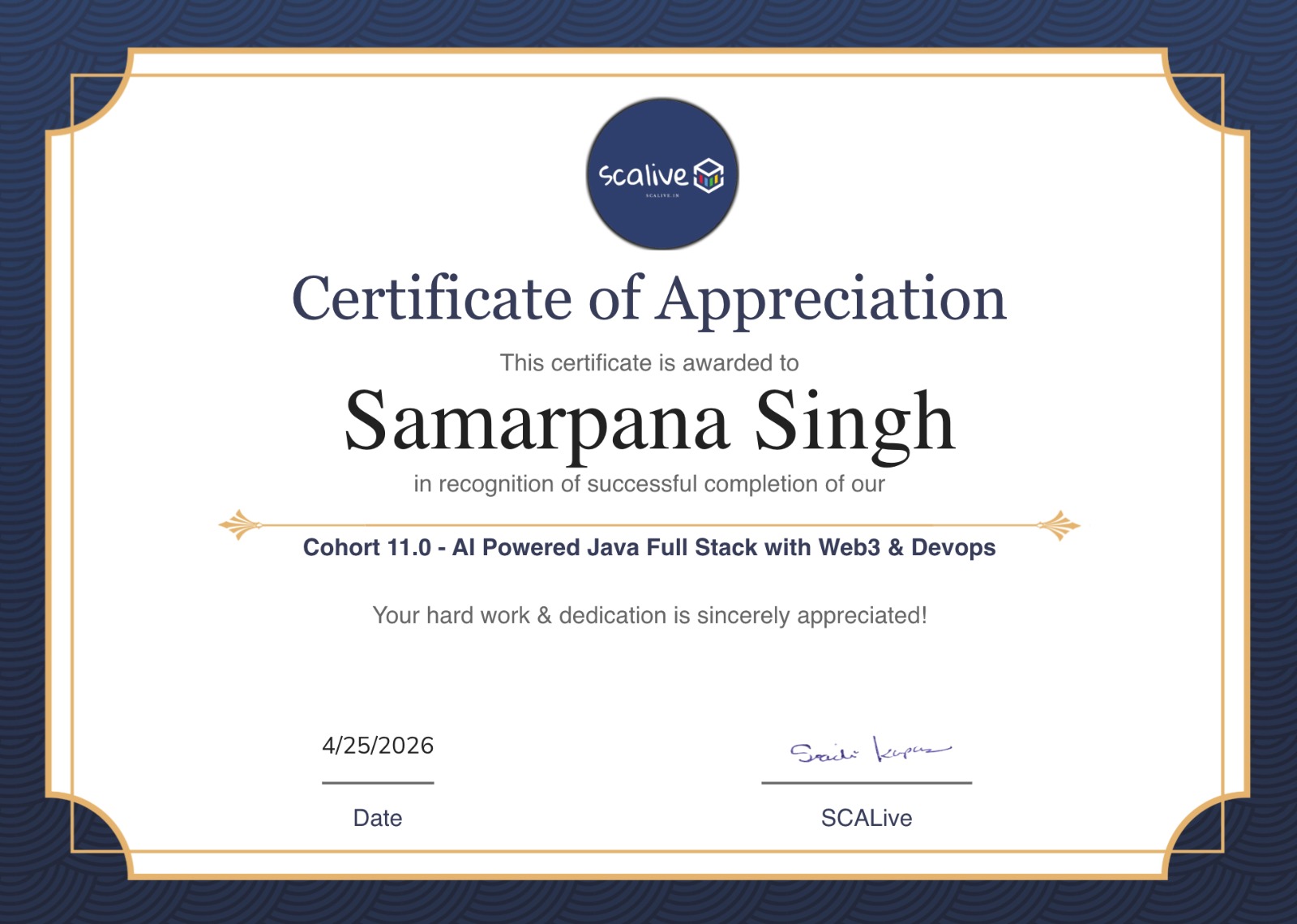
  • 01Blockchain-verifiable certificate, easy to share on LinkedIn
  • 02 Signed by your mentors, not an anonymous organization
  • 03Access to alumni hiring network and opportunities
SCALive sample certificate of completion

We Help Smart Developers
Work Better.

Straight student feedback from the our Batch, kept simple and honest.

Somya Yadav
"
★★★★★

Udit Sir explains every CSS concept with visualization and hands-on practicals. Complex properties feel manageable after his sessions. Truly grateful for his guidance.

Paras Jain
"
★★★★★

Sir teaches every property by visualization and with beautiful animations and projects. The hands-on approach makes everything click instantly.

Misthi Agrawal
"
★★★★☆

The way concepts are broken down step by step makes even tough Java topics easy. Always feel supported and never lost in class. Thank you so much!

Mukesh Jayswal
"
★★★★★

Already learning industry-standard React and TypeScript patterns. The structure of this cohort is unlike anything else I've tried.

Krishna Gurjar
"
★★★★☆

Project-based approach is what makes this different. You understand the concept instead of just memorizing it. Dedication of the faculty is truly commendable.

Harsh Gupta
"
★★★★★

He makes everything look easy. Complex OOPs and Exception Handling topics became crystal clear after rewatching the lectures once. Best decision joining this cohort.

Shruti Jain
"
★★★★★

Sachin Sir combines theory with practicals in a way that builds real confidence. OOPs concepts went from confusing to completely clear. Grateful for this experience.

Ritesh Kumar
"
★★★★☆

Excellent mentor — teaches like an elder brother. Feeling confident about frontend projects after every session. The support system here is genuinely different.

Mukta Mahajan
"
★★★★★

Every session is structured and practical. Animation and transition concepts were taught so well that I could build on my own right after class.

Sayed Faizan Ali
"
★★★★★

From OOPs to Spring Boot — everything is taught with real-world context. The mentors genuinely care about your growth.

Yachna Patle
"
★★★★★

Truly grateful to have such a teacher. Polymorphism and Inheritance explained with examples makes it impossible to forget. Love learning here.

Aditya Kesri
"
★★★★☆

So supportive and interactive. Every doubt gets resolved and the practical approach to CSS has completely changed how I build UIs.

Abhishek Choubey
"
★★★★☆

Foundation building approach is great. Flex and responsive CSS now feel natural. The structured roadmap keeps everything on track.

Khanak Sahu
"
★★★★☆

Animations and transitions are now my favorite part of frontend. Visual examples make every concept stick. Very satisfied with the progress so far.

Somya Yadav
"
★★★★★

Udit Sir explains every CSS concept with visualization and hands-on practicals. Complex properties feel manageable after his sessions.

Harsh Gupta
"
★★★★★

He makes everything look easy. Complex topics became crystal clear after rewatching lectures once. Best decision joining this cohort.

Krishna Gurjar
"
★★★★☆

Project-based learning is what makes this different. You understand concepts instead of memorizing them. Dedication is truly commendable.

Shruti Jain
"
★★★★★

OOPs went from confusing to completely clear. Theory plus practicals builds real confidence. Grateful for this experience.

Sayed Faizan Ali
"
★★★★★

From OOPs to Spring Boot — everything is taught with real-world context. The mentors genuinely care about your growth.

Paras Jain
"
★★★★★

Every property taught by visualization with beautiful animations and projects. Hands-on approach makes everything click instantly.

Ritesh Kumar
"
★★★★☆

Teaches like an elder brother. Feeling confident about frontend after every session. The support system here is genuinely different.

Engineers who still write code.

Your mentors aren't retired career-coaches. They ship every week, debug at 2 AM, and will pull up your repo live.

Sachin Kapoor
Sachin Kapoor
SCALive
Sayed Faizan Ali
Sayed Faizan Ali
SCALive
Udit Namdev
Udit Namdev
SCALive
Paramjeet Singh
Paramjeet Singh
SCALive
Shruti Jain
Shruti Jain
SCALive

Questions, answered.

Do I need prior coding experience?+
No, you don’t need prior experience. This is designed for freshers. We start from the basics and guide you step by step toward building real, practical projects.
What if I miss a live class?+
Every class is recorded and dropped into the LMS within 2 hours. But showing up live matters - that's where the real back-and-forth happens.
Is there a placement guarantee?+
No, and anyone promising one is lying. What you get: a portfolio that stands out, a referral network of 500+ hiring partners, and mock interviews until you're actually ready. The rest is your execution.
Can I work a full-time job alongside?+
Many do - classes are in the evening (9:00 PM IST). Expect to put in ~15-20 hrs/week on top of your job. It's hard. It's supposed to be.
What's the refund policy?+
Full refund within the first 7 days if you decide it's not for you - no questions asked. After that, pro-rated up to the end of month one.
How is this different from other cohorts?+
Most cohorts teach syntax. We teach systems. You'll graduate with 6 shipped products, not 6 GitHub tutorials. Ask us for alumni contacts - they'll tell you more than any sales page can.

Ready to build something real? Seats close every cohort. Grab yours, meet your mentors, ship your first scalable product.


scalive.